
Ditch the bloatware.
Keep total hardware control.
Modes, 7-point fan curves, power budgets, graphics switching, and RGB lighting in a single 1.6 MB executable. A lightweight, privacy-first replacement for vendor software (OMEN Gaming Hub, Armoury Crate, PredatorSense) with zero ads, zero background services, and zero telemetry.
irm https://github.com/sahilneverdies/Seal/releases/latest/download/Seal.exe -OutFile Seal.exe; .\Seal.exe
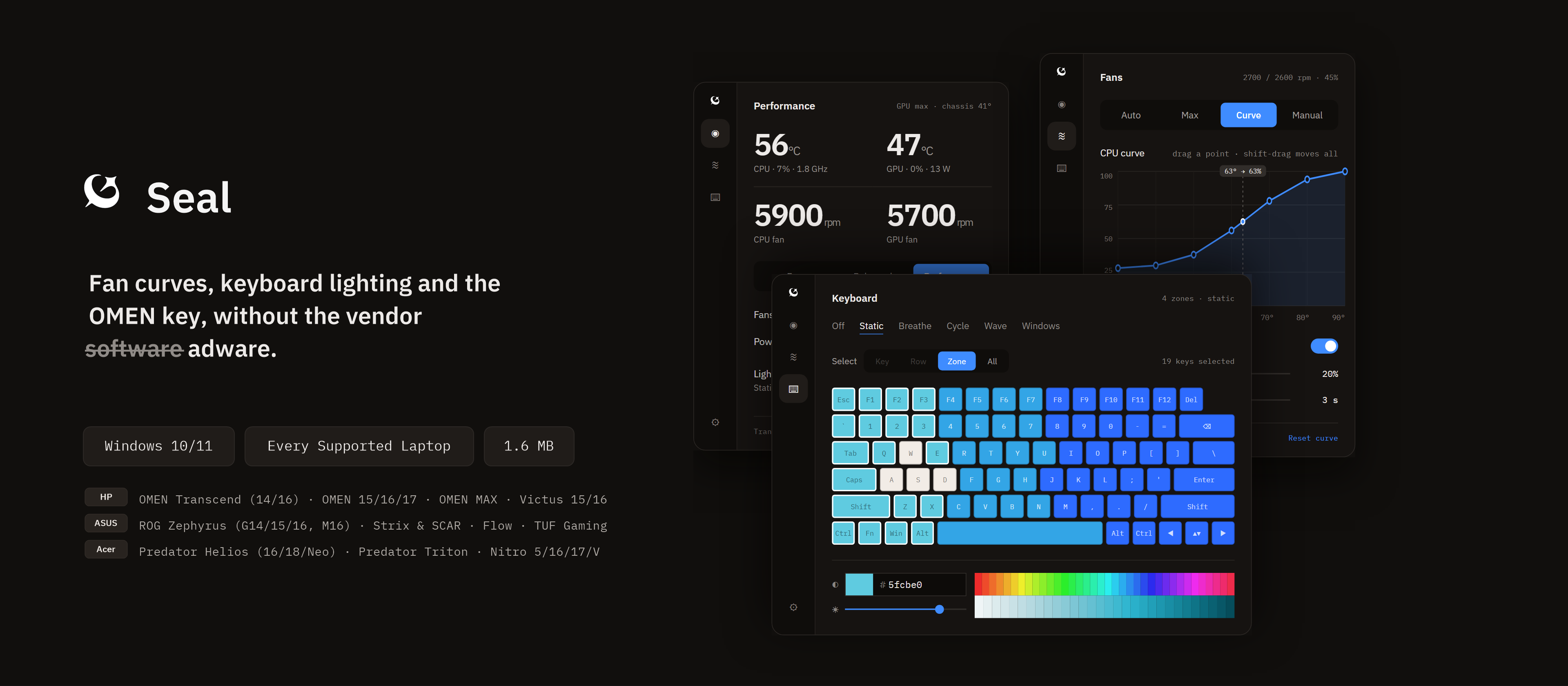
Designed with precision for Windows
Compact, fast, and keyboard-friendly. Runs right from your system tray without opening a window.
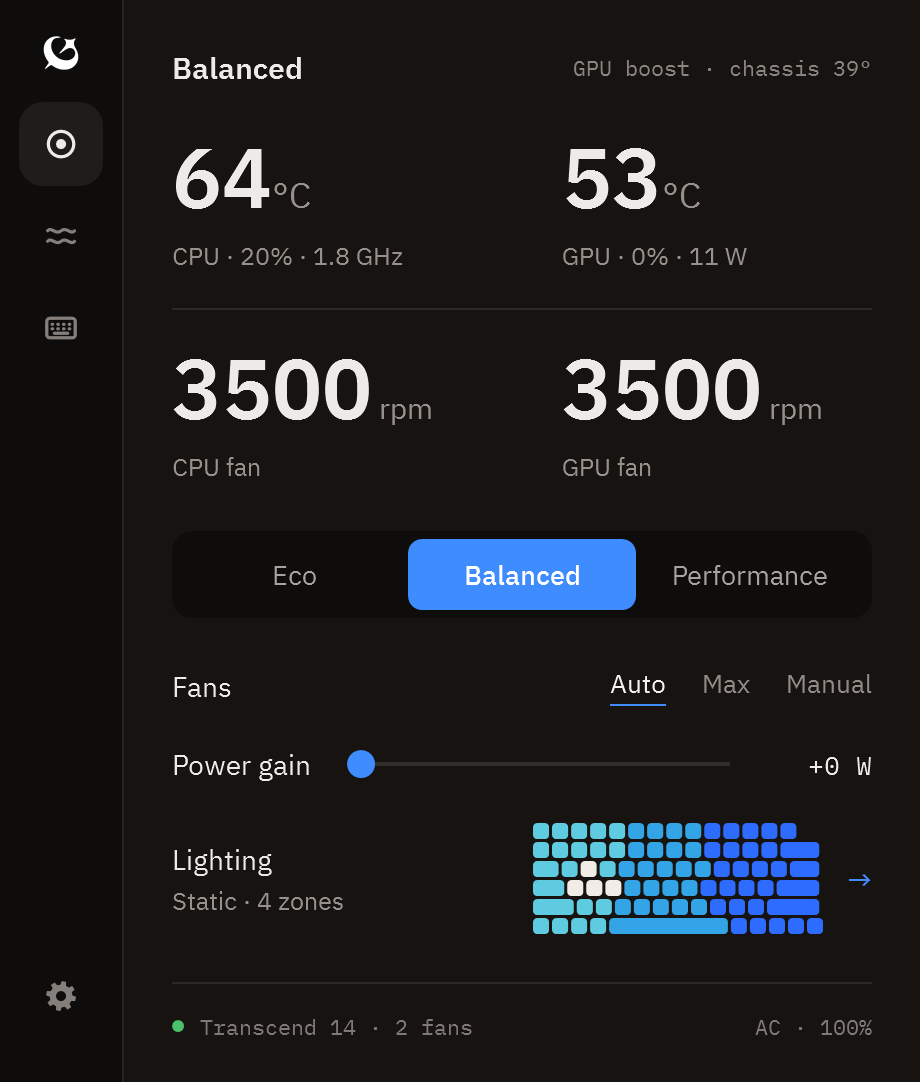
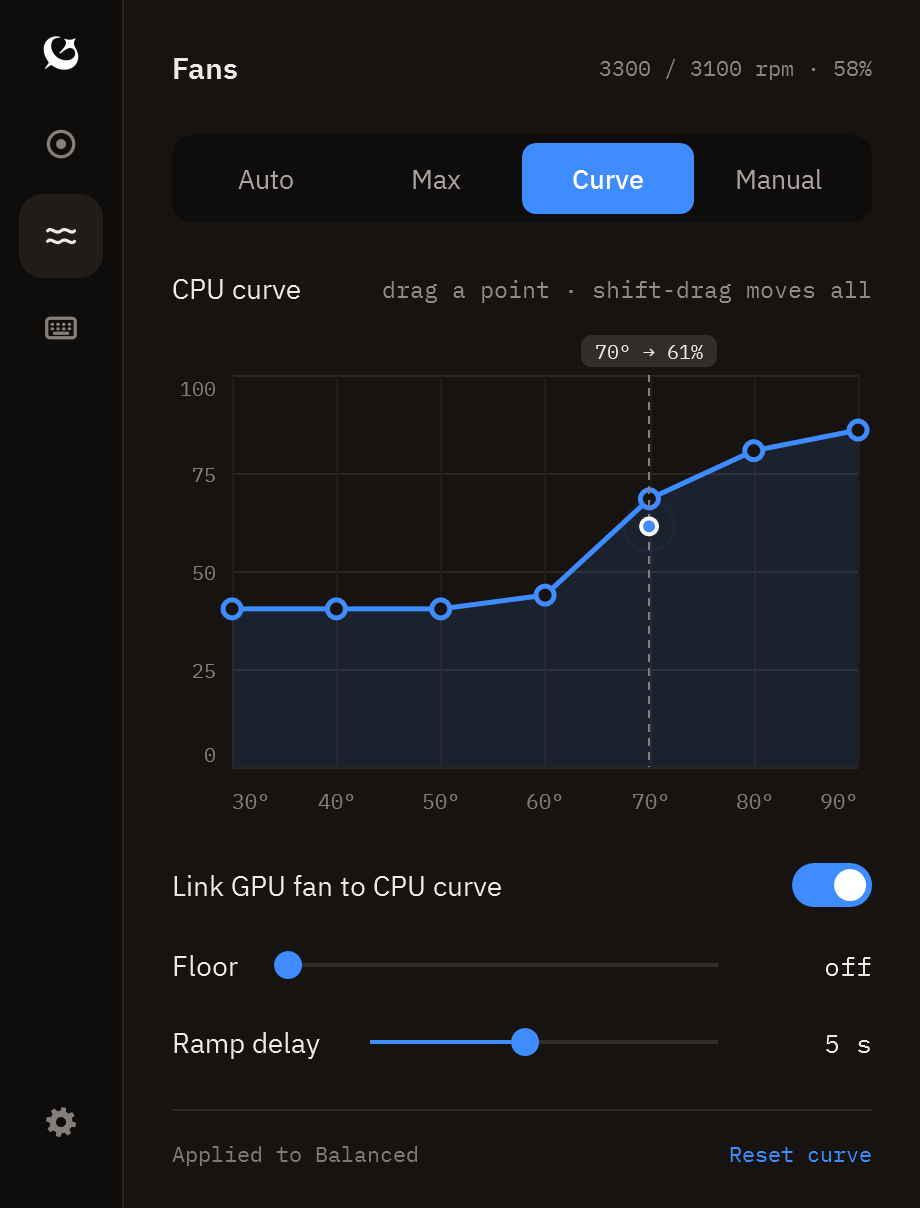
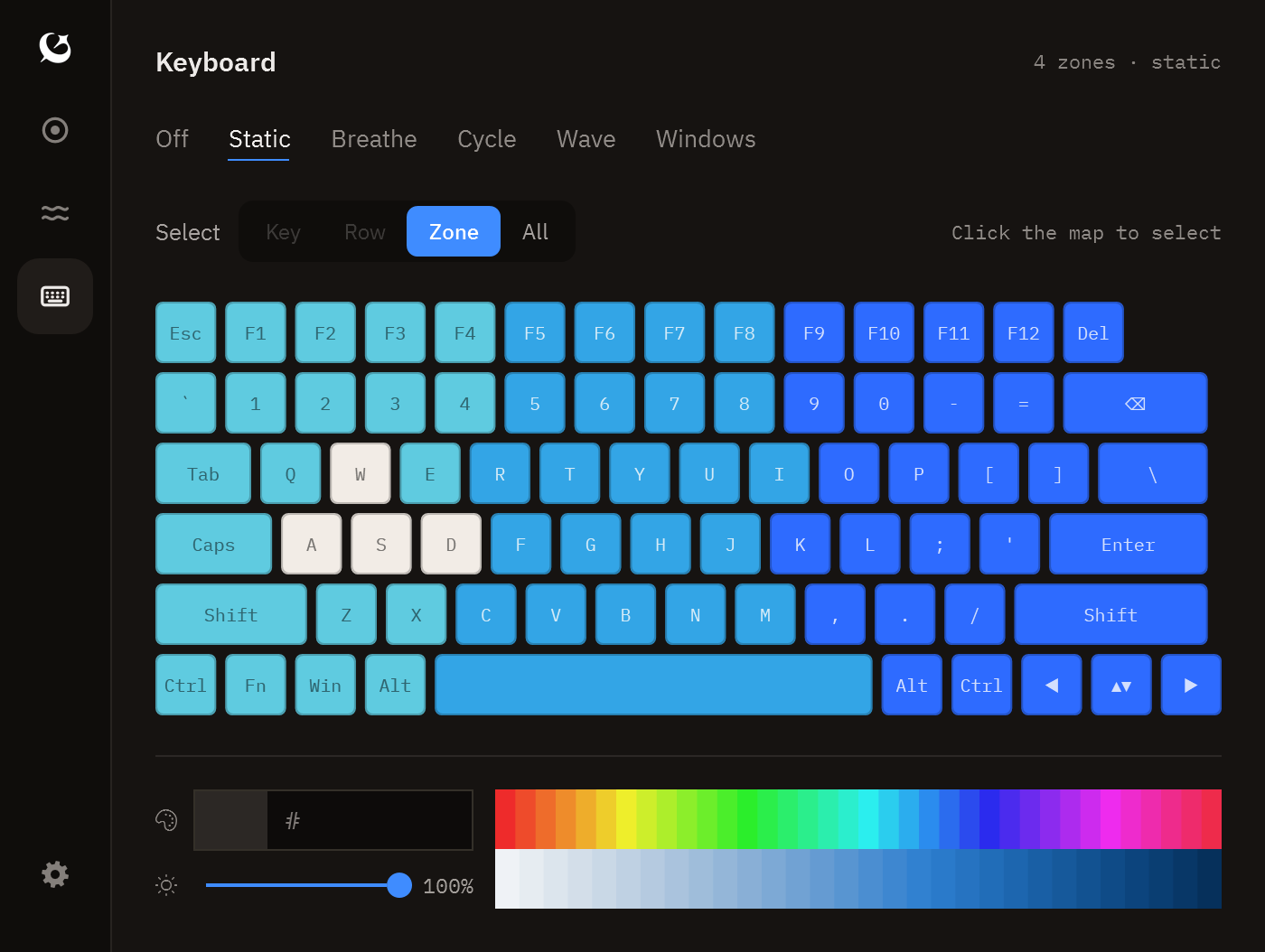
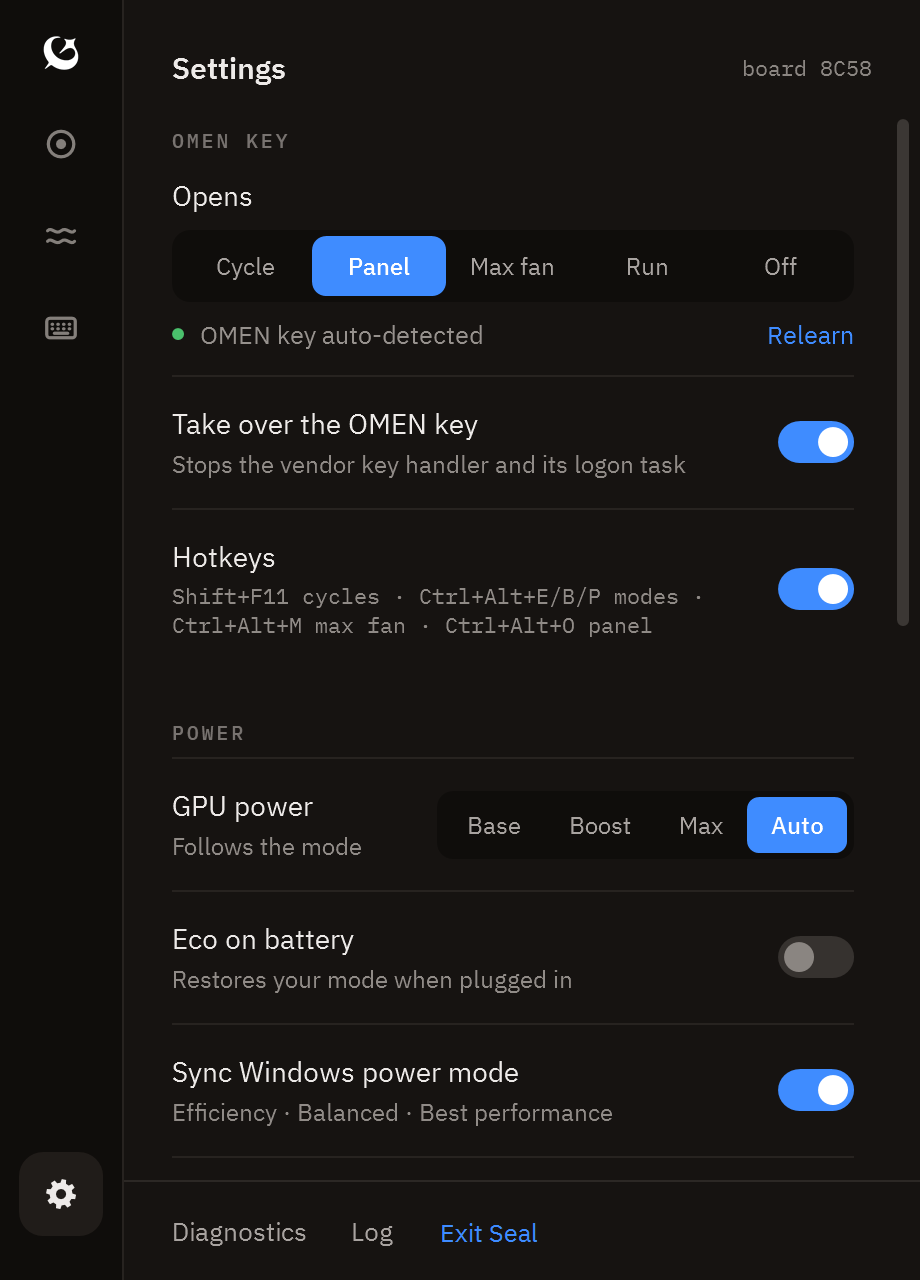
Everything you need. Nothing you don't.
Full access to OEM firmware registers without the memory leaks, ads, and login prompts.
Thermal & Power Modes
Instantly toggle Eco, Balanced, and Performance / Turbo modes with one click, a global hotkey, or vendor key. Remembers custom fan curves and wattage per profile.
7-Point Fan Curves
Drag seven temperature-to-RPM control points, customize hysteresis ramp delays, set safety floors, or toggle Max Fan with smart auto-cool off after 60°C.
GPU MUX & Power Gains
Switch between Hybrid, Discrete (direct dGPU MUX), and iGPU-only modes. Boost CPU+GPU power budget (+0W to +15W) and configure NVIDIA Dynamic Boost levels.
RGB Keyboard Lighting
Interactive visual keyboard canvas. Customize 4-zone or per-key illumination with Static, Breathe, Cycle, Wave animations, or delegate to Windows Dynamic Lighting.
Optional PawnIO Driver
Zero mandatory drivers. Need direct register access? Install the open-source signed PawnIO driver with one click to read raw CPU package sensors and bypass EC fan limits.
Tray Sensor Dashboard
Live CPU/GPU temps, package wattage, fan RPMs, chassis thermal probe, and battery discharge rates directly rendered in the Windows taskbar system tray.
Direct Firmware Communication
Seal communicates directly with your laptop's low-level ACPI WMI and BIOS mailboxes—the exact interface vendor utilities use, without their runtime baggage.
- HP ACPI WMI hpqBIntM (0x1A modes, 0x27 max fan, 0x2E curves, 0x29 power, 0x52 MUX)
- ASUS ACPI WMI ASUS_WMI (Throttle Thermal Policy 0/1/2, Fan Boost, Fan RPM Tachs)
- Acer Gaming WMI Acer_WMIData & EC (Quiet, Normal, Turbo, CoolBoost max fans)
- WMI Events hpqBEvnt (OMEN key intercepted and remapped)
Read our full reverse-engineering notes in docs/research.md.
Supported Laptops
Over 80 laptop models tested and supported across HP, ASUS, and Acer. Seal queries system-design tables dynamically at runtime to match your motherboard's generation.
| Vendor | Model Family | Board / Product IDs | Status |
|---|---|---|---|
| HP | OMEN Transcend 14 (2024) | 8C58 (Reference machine) | ✓ Verified |
| HP | OMEN Transcend 14 (2025) | 8E41 | Supported |
| HP | OMEN Transcend 16 (2023–2025) | 8BB3, 8C3B, 8C4D | ✓ Verified |
| HP | OMEN 16 (2021–2022) | 8A42, 8A43, 8A4C, 8A44, 8A4D | ✓ Verified |
| HP | OMEN 16 (2023–2025) | 8BA9, 8BAA, 8BAB, 8BCA, 8BCD, 8C76, 8C77, 8C78, 8D24, 8D26, 8D2F, 8E35 | ✓ Verified |
| HP | OMEN MAX 16 (2025) | 8D41, 8D87, 8D88 | ✓ Verified |
| HP | OMEN 15 (2019–2020) | 8574, 8600, 8A15 | Supported |
| HP | OMEN 15 / 17 (2021) | 8BAD | ✓ Verified |
| HP | OMEN 17 (17-db1xxx) | 8E10 | ✓ Verified |
| HP | HyperX OMEN 15-gb0xxx (2026) | 8EEC | ✓ Verified |
| HP | OMEN 15 / 17 Legacy (2018–2021) | 8748, 8787, 88D2 + 40 additional legacy boards | ✓ Verified |
| HP | Victus 16 (2021–2023) | 88F8, 8A25 | ✓ Verified |
| HP | Victus 15-fb0xxx | 8A3D | Supported |
| HP | Victus 16-r0xxx | 8BC2 | ✓ Verified |
| HP | Victus 16 S / R (2023–2024) | 8B2F, 8BBE, 8BD4, 8BD5, 8C99, 8C9C | ✓ Verified |
| HP | Victus 15 & 16 (Additional Models) | 88D9, 88DA, 88EE, 8A26, 8A3E, 8C2F, 8C30, 8C3F, 8D07, 8DCD, 8DCF, 8E5E | ✓ Verified |
| ASUS | ROG Zephyrus G14 / G15 / G16 / M16 / Duo | GA401, GA402, GA403, GA502, GA503, GU603, GU604, GU605, GX550, GX551, GX650 | Supported |
| ASUS | ROG Strix & SCAR (15, 16, 17, 18) | G512, G513, G533, G614, G634, G712, G713, G733, G814, G834 | Supported |
| ASUS | ROG Flow (X13, Z13, X16) | GV301, GV302, GZ301, GV601 | Supported |
| ASUS | TUF Gaming A15 / A16 / A17 | FA506, FA507, FA617, FA706, FA707 | Supported |
| ASUS | TUF Gaming F15 / F16 / F17 / Dash | FX506, FX507, FX607, FX706, FX707, FX516, FX517 | Supported |
| Acer | Predator Helios (16, 18, 300, 500, 700, Neo 16) | PH16, PH18, PH315, PH317, PH517, PH717 | Supported |
| Acer | Predator Triton (14, 16, 17, 300, 500) | PT14, PT16, PT17, PT314, PT315, PT515, PT516 | Supported |
| Acer | Nitro Series (Nitro 5, 16, 17, Nitro V 15/16) | AN515, AN517, AN16, AN17, ANV15, ANV16 | Supported |
✓ Verified: Confirmed by an owner with active hardware telemetry. Boards marked Supported communicate via standardized vendor WMI interfaces out of the box.
How to verify your laptop or report issues
Help expand our verified list. Testing takes less than 3 minutes.
Finding your board ID
Open Seal and look at the header in Settings, or run this quick PowerShell command:
(Get-CimInstance Win32_BaseBoard).ProductVerification Checklist
- Modes: Cycle through Eco → Balanced → Performance. Notice the fan acoustics adjust.
- Fans: Toggle Max Fan, try a custom 7-point curve, and test Manual sliders.
- Power & GPU: Test power gain (+15W) and MUX switch if offered by your BIOS.
- Lighting: Verify keyboard zone colors and dynamic lighting effects.
- Submit: Click Settings → Report Issue to automatically copy non-sensitive diagnostics and open a prefilled GitHub verification ticket.